SmartRent
- 4.5
- Rating
- 500.00K
- Installs
- Free
- Price

 Analysis by App-foxy
SmartRent is the kind of House & Home app that can feel immediately useful when your daily routine already depends on a connected rental home or apartment. I found the appeal strongest in the small moments: checking the app before reaching for keys, using it as a central place for home-related controls, and reducing the number of separate steps involved in ordinary access. It is free, aimed at Everyone, and developed by SmartRent, so the barrier to trying it is low.
That first impression is important, but it is not the whole test. A smart-home app earns a permanent place on a phone only when it remains dependable after the novelty disappears. My view is that SmartRent has a practical role for residents whose property supports its system, while its value is much lower for someone looking for a broad, independent smart-home controller. The difference comes down less to excitement and more to whether the app fits the building, the lease, and the habits you already have.
What SmartRent feels like during the first week
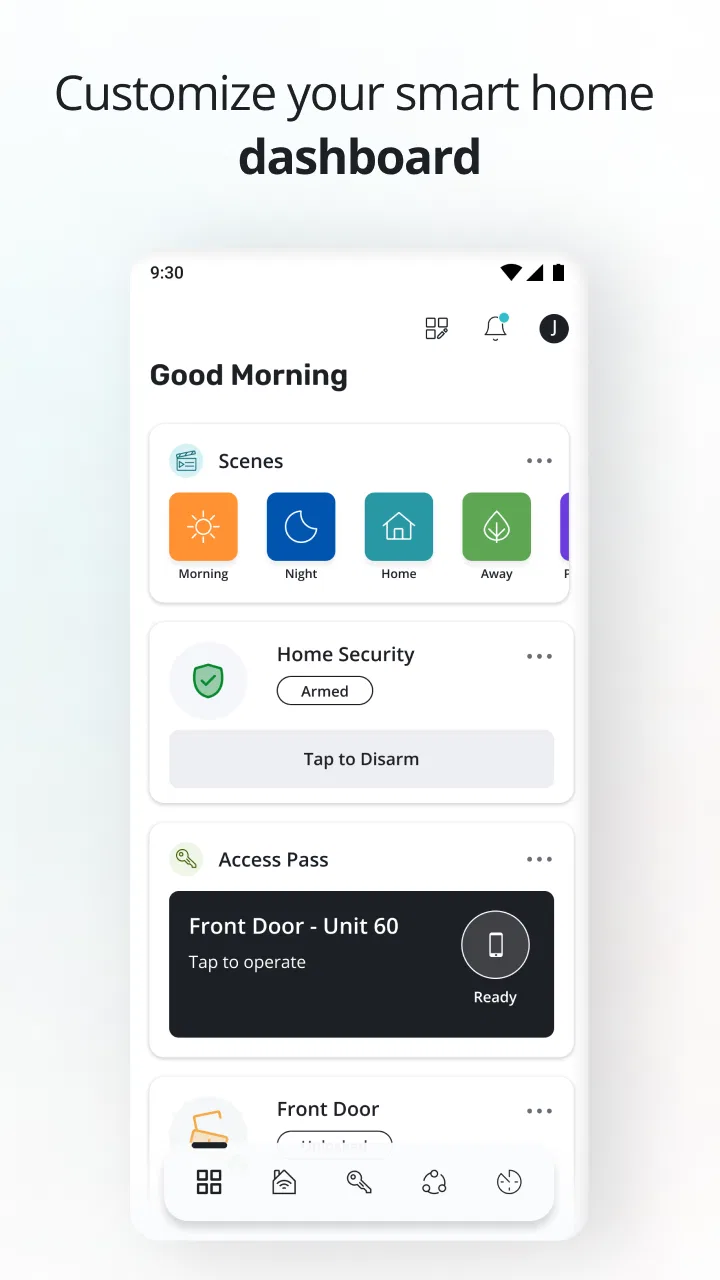
During the first week, the main benefit is consolidation. Instead of treating connected home access as a separate gadget or an occasional technology demo, SmartRent puts the experience inside a familiar mobile workflow. That makes the app easier to understand than a collection of unrelated controls. I would approach it as a resident tool first, not as a hobbyist platform for endlessly experimenting with devices.
You May Also Like

 Blood Strike: 2.5 Anniversary
Blood Strike’s Loadouts Turn Every Drop Into a Tactical Gamble
A close look at Blood Strike’s custom loadouts: how fast access to signature weapons reshapes its battle royale rhythm, rewards preparation, and narrows the gap between fights.

 Pandora - Music & Podcasts
Pandora’s Music Is Easy to Start, but Harder to Recover
Pandora’s strength is its low-effort path from a seed to a station. Its weak spot is how much confidence it asks you to place in connection, setup, and quiet recovery.

 8 Ball Pool
 Is Built on Rivalries, Rematches, and Routine
A close look at the rivalries, rematches, shared routines, and unanswered safety questions that turn a quick pool match into a persistent mobile community.

 Samsung Music
’s Quiet Strength Is Playing What You Already Own
Its reach comes less from spectacle than from dependable access to a personal library. That simplicity is both the app’s strongest retention engine and its ceiling.

 AccuWeather: Weather Radar
AccuWeather Review: A Quick, Clear Forecast for Everyday Decisions
For everyday plans, the best forecast is the one you can understand quickly. AccuWeather makes rain timing, radar, and local conditions easy to act on, with a few trade-offs.

 Hill Climb Racing
Why Hill Climb Racing Still Turns Crashes Into One More Run
A tiny car, a bumpy hill and one more upgrade: Hill Climb Racing keeps resurfacing because its simple chaos makes every near-miss feel personal.
More From Our News Desk



The first useful habit is opening the app before you need it. For example, imagine leaving work with groceries in the car while a delivery is expected at home. The value is not that the app makes the situation exciting; it is that a home-access task can be handled from the same place you already use for other resident interactions. That kind of convenience is modest, but repeated convenience is exactly what makes a home app worthwhile.
There is also a psychological advantage to having one recognizable destination. When a person is tired, carrying bags, or arriving late, remembering which accessory or separate controller handles a task is unnecessary friction. SmartRent’s strongest first-week impression is therefore organizational: it can make connected living feel less scattered when the property’s setup is compatible with it.
New users should still give themselves time to learn the app’s rhythm rather than judging it after one tap. A connected-home experience depends on more than the application itself. The resident’s account, the property’s installed equipment, the phone’s connection, and the home’s own connectivity all affect what happens. If something feels unavailable, I would first check whether the issue is tied to the property setup instead of assuming the app is designed to provide every smart-home function everywhere.
That distinction answers a common question: can anyone use SmartRent as a general replacement for every home-control app? I would not recommend assuming that. Its usefulness is tied to the environment it is meant to serve. Someone moving into a supported property may find it central to daily life; someone in a conventional home without the corresponding setup may have little reason to keep it installed.
The app has been available since September 7, 2017, which gives it a more established presence than a brand-new experiment. Its current version is 4.8.2, and it works on Android 8.0 or later. Those details matter for people using an older phone: compatibility should be checked before planning a move away from physical keys or other familiar routines.
I also like that the app is free to install. That makes testing the experience less risky, although “free” does not mean the surrounding home technology is free or available in every building. The practical question is not whether downloading costs anything; it is whether the resident’s property has made SmartRent part of its access and home-management arrangement.
The everyday scenario that explains its appeal
Consider a resident who has a busy morning, leaves in a hurry, and later needs to coordinate entry for a visitor or service appointment. With a conventional setup, that may involve a physical key, a call, a building office, or a separate device. SmartRent can be valuable when it turns that kind of coordination into a phone-based routine. The advantage is especially clear for people who already live through their phone and dislike carrying extra items.
However, I would keep a backup habit. Phones run out of power, connectivity can be inconsistent, and any digital access system can create stress if a person treats it as the only possible route into the home. Keeping the property’s recommended backup method available is not a criticism unique to SmartRent; it is sensible planning whenever a phone becomes part of the door-access experience.
Why the value can last beyond the novelty
After the first month, the question changes from “What can this do?” to “Does this save me effort often enough to matter?” For SmartRent, lasting value comes from repetition. If the app supports tasks you perform regularly, it can become invisible in the best sense: not something you open for entertainment, but something you use because it is the shortest path through a routine.
That recurring value is strongest for residents who have several reasons to interact with their home digitally. A person who only needs occasional access may prefer a physical key or a simpler building process. Someone managing arrivals, departures, visitors, or other home-related moments may appreciate having one resident-focused app instead of relying on memory and multiple conversations.
My advice is to judge it over a normal month rather than during a move-in week. The first days are full of setup tasks, curiosity, and novelty. Later, notice whether you still open it because it removes a real step. If you find yourself checking it only to confirm that it exists, it has probably not earned much space on your phone. If it reliably shortens access or coordination tasks, its value is more durable.
SmartRent has a 4.4 average from around 21 thousand ratings, with roughly 2.7 thousand written reviews, and more than 500 thousand installs. Those figures suggest that the app has reached a substantial resident audience and that many people find it useful enough to rate. They do not guarantee that every property delivers the same experience, because a home-management app is shaped by the building’s implementation as much as by the software.
This is one of the most important trade-offs. A broad smart-home platform may offer more flexibility across brands and devices, while SmartRent can make more sense when your property has already chosen its ecosystem. In the first case, you are selecting a platform and assembling your own setup. In the second, the building’s existing arrangement determines much of the app’s usefulness. I would choose SmartRent for integration with a supported residence, not because it is automatically the best universal option.
Habits that make the app more dependable
I found three habits particularly sensible for long-term use. First, keep the app easy to reach, but do not make it your only access plan. Second, test important actions during a calm moment rather than waiting until you are standing outside with your hands full. Third, after changing phones or updating the operating system, verify the routine before relying on it during a time-sensitive arrival.
These are not glamorous features, but they are the difference between a connected-home app that feels helpful and one that becomes a source of avoidable anxiety. The best smart-home routine is usually the one that has been rehearsed before it matters.
Another useful habit is separating resident convenience from emergency planning. SmartRent may simplify ordinary access and coordination, but I would not treat a phone app as a substitute for knowing the property’s normal support route. If a device is lost, a phone battery fails, or access behaves unexpectedly, the resident should know how the building handles those situations. That preparation protects the convenience instead of undermining it.
Maintenance, friction, and the work behind convenience
The maintenance burden is not necessarily heavy, but it is real. A connected-home app asks you to maintain more than the application itself. Your phone needs to remain compatible, your account needs to remain usable, and the property’s connected equipment needs to be functioning. This is a different kind of maintenance from changing batteries in a traditional lock: less physical, but more dependent on software and service continuity.
For many residents, that exchange is worthwhile. A phone is already part of daily life, so adding home access to it may feel simpler than carrying another object. For others, it introduces a new point of failure. If you strongly prefer systems that work without accounts, updates, or a charged phone, the traditional alternative may be calmer and more predictable.
There is also a learning cost when the app’s behavior is affected by the property. A resident may reasonably expect the same experience in every apartment, yet buildings can differ in equipment, policies, and the way access is arranged. I would ask the leasing or property team what SmartRent is intended to handle before building your entire routine around it. That question can prevent disappointment more effectively than reading a generic feature list.
One non-obvious advantage of thinking this way is that it clarifies who should provide help. If the issue concerns the app’s basic operation, SmartRent is the relevant name to recognize. If the issue concerns a particular door, resident permission, or installed equipment, the property may be the more useful first contact. Knowing that distinction can save time when something does not behave as expected.
Updates deserve a practical rather than emotional response. I do not see version changes as a reason to avoid the app, but I would avoid updating immediately before an important trip or a late-night arrival if the app is central to access. Give yourself a quiet opportunity to open it and confirm that your usual routine still makes sense. That small buffer is more valuable than assuming every update will be invisible.
The minimum operating-system requirement is Android 8.0. For most current phones, that should not be a major obstacle, but people keeping older devices for cost or backup reasons should pay attention. A smart-home tool is only useful when it works on the phone you actually carry, not the phone you might replace later.
Where long-term fatigue can begin
The biggest source of fatigue is dependence. At first, using a phone for home access feels modern and convenient. Over time, the same action can feel like an extra responsibility if the user has to think about battery life, connectivity, app availability, or whether a visitor can complete the process smoothly. The novelty fades, and the resident is left with the practical question of whether the digital route is genuinely easier than the old one.
Another source of fatigue is mismatch. If your property supports only a narrow slice of what you want to do, you may still need separate tools, physical methods, or direct communication with management. SmartRent can then become one more app rather than the single place you hoped for. That does not make it a poor product; it means the surrounding setup determines whether consolidation actually happens.
I would also be cautious if you are a smart-home enthusiast who wants deep control over a mixed collection of products. SmartRent is better understood as a resident-facing home platform than as an open-ended laboratory for combining every brand and automation idea. A different, more flexible smart-home ecosystem may suit you better if customization is the main reason you are shopping for an app.
Privacy and comfort can influence the decision even when the app works well. Some people are happy to use a phone as part of their home routine; others prefer minimizing digital involvement in something as basic as entering their own home. I would not dismiss that preference. Convenience is personal, and a feature that removes a key from one person’s pocket can feel like an unnecessary dependency to another.
There is a useful way to test this before committing emotionally: imagine the app unavailable for a day. Do you know the alternative access method? Do you know whom to contact? Would visitors or deliveries become difficult? If the answers are clear, the app can remain a convenience rather than a single point of failure. If the answers are unclear, the problem is not necessarily SmartRent alone; the household routine needs a backup plan.
People also ask whether the app is suitable for families, older relatives, or occasional guests. My answer is conditional. It can work well for a household whose members are comfortable with smartphones and whose property has made the system part of normal access. It may be less suitable for someone who needs a very simple, device-independent method or for guests who are unlikely to install and learn a new app for one short visit.
For that reason, I would avoid assuming that digital access automatically improves every handoff. A physical key, a building-approved method, or direct coordination may still be better for a visitor who is unfamiliar with the system. SmartRent is most convincing when the people using it regularly share the same routine and expectations.
Who should keep it installed?
I would recommend keeping SmartRent installed if you live in a property that actively uses it and you regularly benefit from phone-based home access or resident coordination. In that situation, removing it may simply bring back steps that the app was designed to reduce. The free price also makes it reasonable to keep available when it is part of your normal home arrangement.
I would be more hesitant for someone who does not live in a supported environment, rarely uses digital home tools, or strongly values a physical, offline routine. The app is not automatically useful just because it belongs to the House & Home category. Its lasting value comes from a relationship between the software and a specific residence.
It is also worth separating app quality from property experience. If a building’s equipment is unreliable or its resident processes are confusing, SmartRent may feel frustrating even when the application is doing its part. Conversely, a well-organized property can make the app feel impressively simple. When deciding whether to blame or praise it, I would look at the whole chain rather than the screen alone.
SmartRent is rated for Everyone, which makes its intended audience broad, but that does not remove the need for practical judgment. A rating tells you the app is suitable in content terms; it does not promise that every user will find phone-based access comfortable or that every household member will want the same workflow.
My long-term verdict
After the first-week appeal wears off, SmartRent earns its place when it becomes a quiet part of a supported resident’s routine. I value it less as a flashy smart-home novelty and more as a way to reduce small points of friction around home access and coordination. That is a modest promise, but it is the kind that can survive month after month when the surrounding property setup is dependable.
Its limitations are equally clear. It is not the right choice as a universal answer for every smart-home device, and it should not replace sensible backup planning. The app’s usefulness can vary with the building, the installed system, the phone being used, and the user’s tolerance for digital dependence. Those conditions matter more than the store summary.
My final recommendation is therefore specific: if SmartRent is part of your residence, try it seriously, build a backup habit, and judge it by the number of ordinary tasks it removes from your day. If your home does not rely on it, I would not install it merely to explore smart-home possibilities; a broader platform may be a better fit. For the right resident, the lasting benefit is not novelty but fewer repeated access hassles.
SmartRent has been free to use as an app, carries an Everyone age rating, and has accumulated a sizeable user base since its release. Those facts make it easy to try, but the real verdict comes from daily life. In my experience, it deserves a permanent place on the phone of a supported resident who values convenience and remembers to maintain a backup plan. For everyone else, its role is more limited, and choosing a simpler or more flexible alternative may be the wiser long-term decision.
FAQs for SmartRent
01What is SmartRent and how does it work?
SmartRent is a comprehensive smart home automation app designed for renters and property managers. It enables users to control smart locks, thermostats, lights, and more from their mobile devices. The app integrates with various smart home devices, providing a seamless experience for monitoring and managing property features remotely.
02Is SmartRent compatible with all smart home devices?
SmartRent supports a wide range of smart home devices, including those from major brands like Google Nest and Amazon Alexa. However, compatibility may vary depending on specific device models. It's advisable to check the SmartRent website or contact customer support to ensure your devices are supported before downloading the app.
03How secure is the SmartRent app?
SmartRent prioritizes user security by implementing robust encryption and authentication protocols. The app ensures that all data transmitted between your devices and servers is secure. Additionally, users can enable multi-factor authentication (MFA) for an extra layer of protection, safeguarding against unauthorized access.
04Can SmartRent be used for multiple properties?
Yes, SmartRent is designed to handle multiple properties efficiently. Users can manage different locations within the app, making it ideal for property managers overseeing several units. The app provides a centralized dashboard for easy monitoring and control, simplifying property management tasks across various locations.
05What should I do if I encounter issues with SmartRent?
If you experience any problems with SmartRent, there are several steps you can take. First, consult the app's help section for troubleshooting tips. If the issue persists, contact SmartRent's customer support via phone or email for personalized assistance. They offer dedicated support to resolve any technical or operational concerns efficiently.
Pros
- Intuitive interface for easy navigation.
- Seamless integration with smart devices.
- Real-time alerts for security updates.
- Customizable automation settings.
- Responsive customer support.
Cons
- Limited compatibility with some devices.
- Occasional app crashes reported.
- Subscription required for full features.
- Setup process can be time-consuming.
- Limited offline functionality.

SmartRent
Gallery